
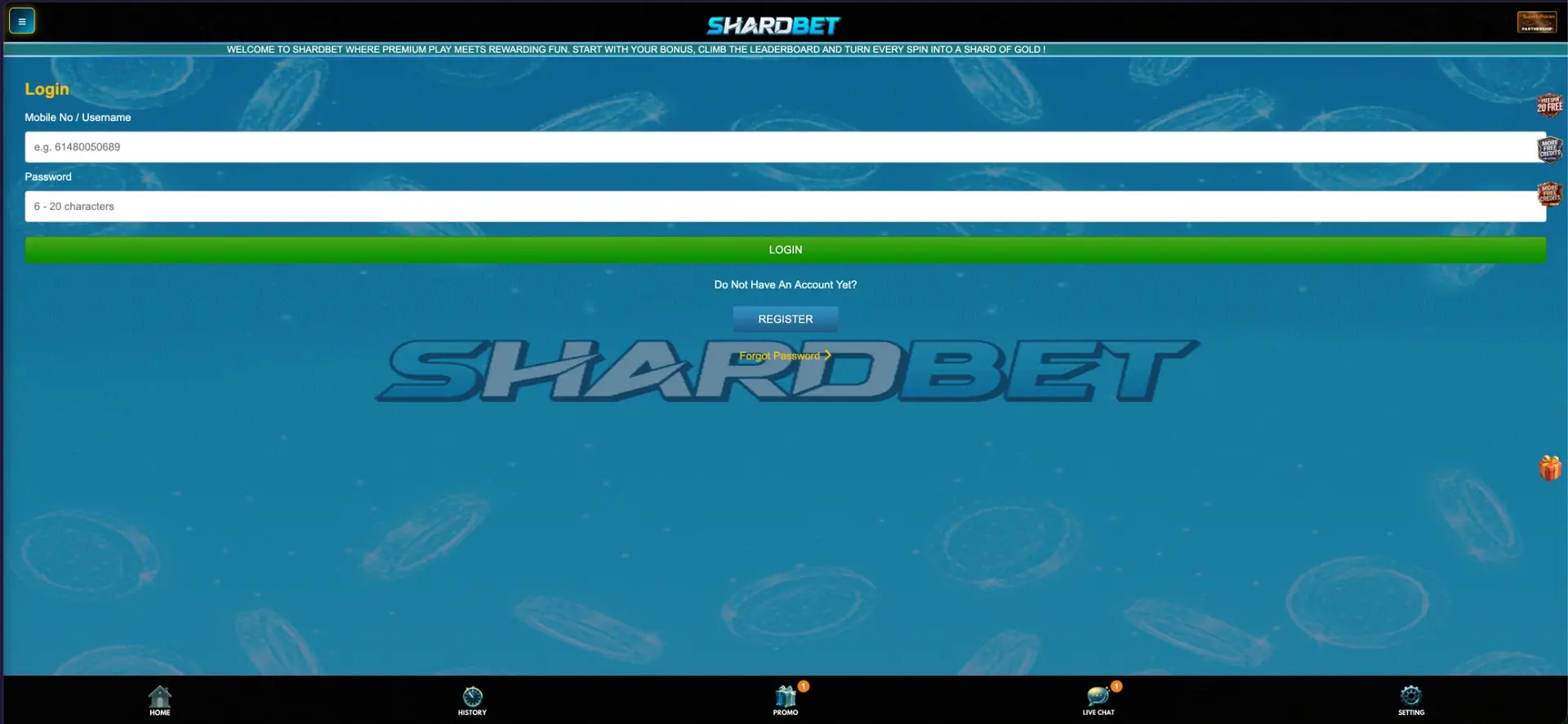
Shardbet login takes two fields: your mobile number or username and your password (6-20 characters). Open shardbetau.com, press Login in the right panel, enter the mobile number in international format starting with 61 (for example 614XXXXXXXX), type the password and press the green LOGIN button. If the password is lost, the Forgot Password link under the form restores access, and players without an account can press Register on the same screen. The same form works in desktop and mobile browsers, and after signing in the AUD balance, cashier and full bet history become available.
The Shardbet casino account is tied to the mobile number confirmed by SMS at registration, which is what keeps the login simple: there is no email address to remember and no separate username is required. This page explains each step of signing in, how to reset a password, what to do when the login fails and what is available in the account once you are inside.
The main details of the Shardbet login process are summarised in the table.
| Login essentials | Details |
|---|---|
| Where to log in | shardbetau.com, Login button in the right panel |
| Login identifier | Mobile number (61 format) or username |
| Password length | 6 to 20 characters |
| Password reset | Forgot Password link under the login form |
| New account | Register button on the login screen |
| Phone confirmation | SMS verification code at registration |
| Device support | Any modern desktop or mobile browser |
| Account currency | AUD |
| Support | Live Chat button in the bottom menu |
How to log in to Shardbet
Signing in to Shardbet takes less than a minute once the account exists. The login form is a single screen with the two input fields at the top, the login button below them and links for registration and password recovery underneath.
Step-by-step Shardbet login
Follow these steps to reach your account from any browser.
- Go to shardbetau.com in Chrome, Safari, Firefox or Edge.
- Press Login in the right panel of the home page.
- In the Mobile No / Username field, enter your mobile number starting with 61, without the leading zero (for example 61480050689), or your username.
- Type your password. It is between 6 and 20 characters long.
- Press the green LOGIN button.
- Check that your AUD balance appears in the right panel. If it shows an old figure, press Refresh.
The mobile number format
The most common sign-in mistake at Shardbet is the format of the phone number. Australian mobiles are usually written as 04XX XXX XXX, but the login field expects the international version: country code 61 followed by the number without the first zero. So 0480 050 689 becomes 61480050689, typed without spaces or a plus sign.
| How the number is usually written | How to enter it at Shardbet |
|---|---|
| 0480 050 689 | 61480050689 |
| +61 480 050 689 | 61480050689 |
| (04) 8005 0689 | 61480050689 |
No account yet: create one first
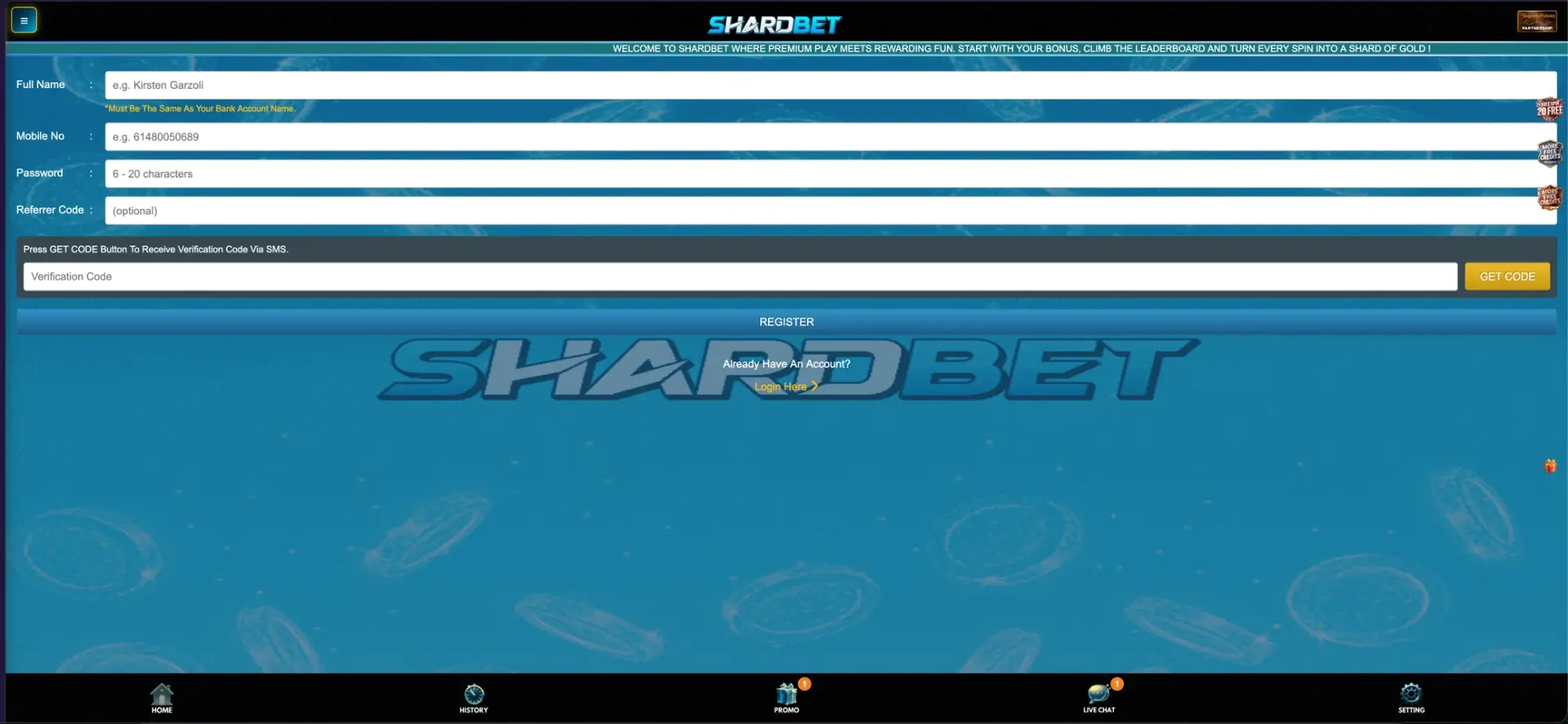
Shardbet login only works after registration, and the login screen links straight to the sign-up form through the Register button under the question "Do Not Have An Account Yet?". Registration uses the mobile number as the account identifier and confirms it with an SMS code, so no email address is needed.
Quick Shardbet registration
The registration form has four fields and an SMS confirmation step.
- Press Register on the login screen or in the right panel.
- Enter your full name exactly as it appears on your bank account.
- Enter your mobile number in 61 format.
- Choose a password of 6-20 characters.
- Add a referrer code if you have one (optional).
- Press Get Code, enter the SMS verification code and press Register.
The name field deserves extra care. The form notes that the full name must be the same as the bank account name, and this name is later used to match withdrawals. Entering it correctly at registration avoids payout delays down the track.
Secure login practices
Because the Shardbet account holds real AUD funds and is linked to a bank account in your name, protecting the login is worth a few minutes. These habits cover the main risks:
- Use a password that is unique to Shardbet and close to the 20-character maximum, mixing letters and numbers.
- Never share the SMS verification code. Shardbet support staff do not need it to help with a question.
- Avoid saving the password in a browser on a shared or work computer.
- Log out after playing on any device that other people use.
- Access the casino only through shardbetau.com and links from its official Telegram, Facebook or WhatsApp channels.
- Check the History tab from time to time for any bets or transactions you do not recognise.
Shardbet password recovery
A forgotten password is not a problem as long as you still have access to the mobile number used at registration. The Forgot Password link sits directly under the login form, marked in yellow with an arrow.
Password reset steps
The reset process follows the same mobile-based logic as registration.
- Open the Shardbet login page and press Forgot Password.
- Enter the mobile number linked to the account in 61 format.
- Follow the on-screen instructions to confirm the number.
- Create a new password of 6-20 characters.
- Return to the login form and sign in with the new password.
If the mobile number has changed since registration, the reset cannot be completed on your own. In that case, contact Shardbet support through Live Chat and be ready to confirm the full name on the account.
Shardbet login on mobile
The Shardbet login works the same way on phones and tablets as on a computer, because the site runs in the browser without a separate download. On mobile, the form stretches to the full screen width and the fixed bottom menu with Home, History, Promo, Live Chat and Setting stays available during sign-in.
Tips for signing in on a phone
A few small adjustments make mobile access faster:
- Add shardbetau.com to the home screen so the casino opens in one tap.
- Let the phone's password manager store the login so the fields fill in automatically.
- Use the numeric keyboard for the mobile number and check that it starts with 61.
- If the page looks cut off, rotate the phone to portrait mode and reload.
Troubleshooting common Shardbet login errors
When the login fails, the cause is almost always one of a few typical issues. The subsections below go through each one and what to do about it.
Incorrect number or password
Check the format of the mobile number first: it must start with 61 and contain no spaces, plus sign or leading zero. Then make sure Caps Lock is off, because passwords are case-sensitive. If the error repeats, use Forgot Password instead of guessing, since several failed attempts in a row may temporarily restrict access.
Page loads but the form does not respond
Browser data can interfere with the login form. These steps solve most cases:
- Clear the browser cache and cookies for shardbetau.com, then reload the page.
- Turn off ad blockers or script-blocking extensions for the site.
- Try another browser, or open the site in a private window.
- Switch between Wi-Fi and mobile data to rule out a network issue.
SMS code does not arrive
This applies mostly to registration and password recovery. Wait a minute before pressing Get Code again, check that the number is entered correctly, and make sure the phone has signal and is not blocking messages from unknown senders. If several attempts fail, Live Chat can check the request.
Account restricted or blocked
An account can be restricted after repeated failed logins, a self-exclusion request or a mismatch in account details. In any of these situations, contact support through Live Chat. Have the registered mobile number and full name ready so the account can be identified quickly.
Balance shows zero after login
If the balance looks wrong right after signing in, the funds may still be sitting in a provider's game wallet. Press Refresh next to the balance to bring the amount back to the main AUD balance.
What you can access after Shardbet login
Once signed in, the full set of account tools becomes available. The right panel and the bottom menu give access to everything a player needs:
- Balance in AUD with Deposit, Withdraw and Refresh buttons.
- Cashier limits: minimum deposit AUD 10 and minimum withdrawal AUD 50, shown under the balance.
- History: a record of bets, deposits and withdrawals.
- Promo: all claimable offers, including the 20% Daily First Deposit, Booongo free spins, red packets and rebates.
- Lobby: JILI, Aristova, Slot, Sport, Fast Game and Live categories with full search.
- Referral tools: Share, Downline and Copy Link for the affiliate programme.
- Leaderboard, Lucky Draw and VIP Tier sections.
- Live Chat and Setting in the bottom menu.
Account details and verification
Shardbet confirms the mobile number at registration through the SMS code, and the full name entered at sign-up is matched against the bank account used for withdrawals. For most players this is the only verification involved. However, as with any casino handling real-money payouts, support may ask for additional confirmation in certain cases, such as a large withdrawal, a change of bank account or details that do not match.
If extra checks are requested, these are the documents casinos usually ask for:
- Photo ID such as an Australian driver licence or passport.
- A recent bank statement showing the account name used for payouts.
- Confirmation of access to the registered mobile number.
FAQ about Shardbet login
Answers to the most common questions about signing in to Shardbet are collected below.
What do I need for Shardbet login?
You need the mobile number used at registration (in 61 format) or your username, plus your password of 6-20 characters.
Can I log in to Shardbet with an email address?
No. Shardbet accounts are created and accessed with a mobile number confirmed by SMS. Email is not used for login.
How do I enter my phone number at Shardbet?
Enter it in international format without spaces: 61 followed by the number without the first zero, for example 61480050689.
What should I do if I forgot my Shardbet password?
Press Forgot Password under the login form and follow the steps using your registered mobile number. If the number has changed, contact Live Chat.
Does Shardbet login work on mobile?
Yes. The login form works in any mobile browser on iPhone and Android, and the casino can be added to the home screen for quick access.
Why is my balance zero after logging in?
Funds may still be in a provider's game wallet. Press Refresh next to the balance to update it.

Independent research for Australian readers. We do not operate the casino or manage player accounts and payments.