
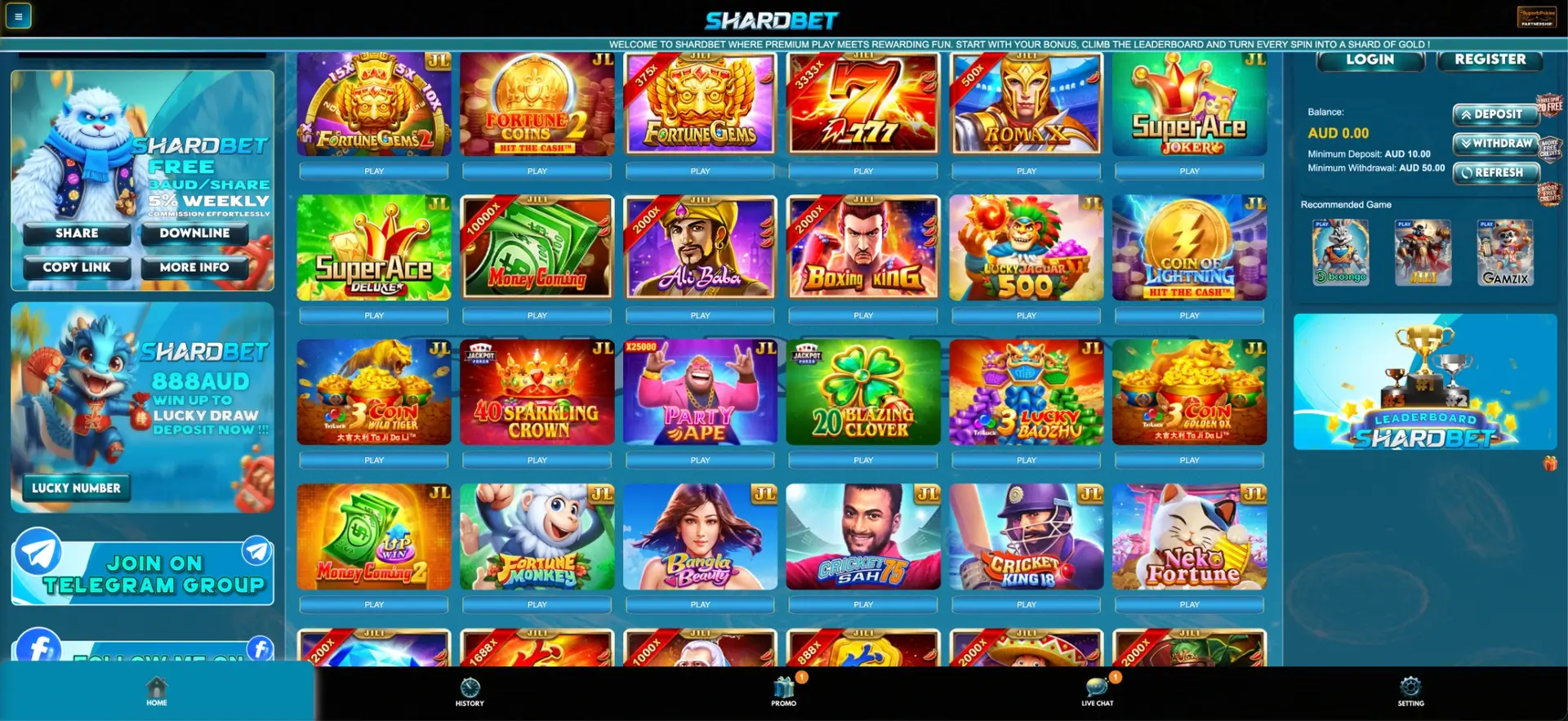
The Shardbet app is the mobile version of the casino that opens in the browser at shardbetau.com on any iPhone, iPad or Android device. There is no file to download from the App Store, Google Play or the site itself: the full casino, including the pokies lobby, Promo section, AUD cashier and Live Chat, works in Safari or Chrome with an app-style bottom menu. To get one-tap access like a regular app, add Shardbet to the home screen through the browser's share or settings menu. Deposits start from AUD 10 and withdrawals from AUD 50, exactly as on desktop.
Many Australian players search for a Shardbet casino app expecting an APK or an App Store listing. The site's design explains why one is not needed: the interface was built around a fixed bottom navigation bar with Home, History, Promo, Live Chat and Setting, which already looks and behaves like a native application on a phone. This page explains how to open Shardbet on mobile, how to create a home screen shortcut on iOS and Android, what is available in the mobile version and how payments and security work.
Here is a quick summary of the Shardbet mobile version.
| Feature | Shardbet on mobile |
|---|---|
| Download required | No, runs in the browser |
| iPhone and iPad | Safari, Chrome or Firefox |
| Android | Chrome, Firefox, Samsung Internet or any modern browser |
| Home screen shortcut | Available on iOS and Android |
| Navigation | Bottom bar: Home, History, Promo, Live Chat, Setting |
| Game lobby | Same as desktop: JILI, Aristova, Slot, Sport, Fast Game, Live |
| Registration | Mobile number and SMS code |
| Cashier | Deposit from AUD 10, withdraw from AUD 50 |
| Bonuses | All Promo offers, rebates and red packets |
| Support | Live Chat from the bottom bar |
| Updates | Automatic, no manual updates needed |
Is there a Shardbet casino app for Android or iOS?
No, Shardbet does not offer a native app in the App Store or Google Play, and there is no APK file on the official site. Casino apps with real-money play are tightly restricted in Australian app stores, so most online casinos serving Australian players use a mobile browser version instead.
In the case of Shardbet, the browser version is not a cut-down copy of the desktop site. The same lobby, promotions and cashier are available, and the layout adapts to the narrow screen. A home screen shortcut adds the missing piece, the app icon, so the casino opens in one tap without typing the address.
The browser-based approach also has a few practical benefits compared with a downloaded app:
- No storage space is used on the phone for installation files.
- New games and promotions appear immediately, without app updates.
- There is no risk of installing a fake APK from an unofficial source.
- The same account and balance work on phone, tablet and computer.
How to open Shardbet on mobile
Getting into the Shardbet app takes a few seconds on any smartphone. The steps are the same for iPhone and Android.
- Open Safari, Chrome or another browser on your phone.
- Type shardbetau.com into the address bar.
- Press Login if you have an account, or Register to create one with your mobile number and SMS code.
- Enter your mobile number in 61 format and your password.
- Use the bottom bar to move between Home, History, Promo, Live Chat and Setting.
How to add Shardbet to your home screen
A home screen shortcut makes the Shardbet casino behave like an installed app: it gets its own icon, opens directly to the site and skips the browser address bar. The process differs slightly between iOS and Android.
iPhone and iPad (Safari)
On Apple devices, the shortcut is created through the Share menu in Safari.
- Open shardbetau.com in Safari.
- Tap the Share icon (the square with an arrow pointing up) at the bottom of the screen.
- Scroll down the share sheet and tap Add to Home Screen.
- Keep the name "Shardbet" or enter your own label, then tap Add.
- The Shardbet icon appears on the home screen and opens the casino directly.
Android (Chrome)
On Android phones, the shortcut is added from the Chrome menu.
- Open shardbetau.com in Chrome.
- Tap the three-dot menu in the top-right corner.
- Choose Add to Home screen (on some phones it is called Install app).
- Confirm the name and tap Add.
- The icon is placed on the home screen or in the app drawer.
Features available in the Shardbet mobile version
Everything that exists on the desktop site is also present in the Shardbet app. The table at the top lists the essentials, and the main sections work as follows on a phone:
- Game lobby: the six category icons (JILI, Aristova, Slot, Sport, Fast Game, Live) and the Slot, Casino, Fish and Card tabs, with a search bar for titles and providers.
- Pokies: Fortune Gems, Super Ace, Money Coming, Golden Empire, Dragon Pearls Hold and Win, Wolf Gold Plus and the rest of the catalogue.
- Instant games: crash, mines and plinko titles such as Crash Cricket Mr.360, Mines Football and Plinko Football, which suit short sessions on a phone.
- Promo: the Slot Welcome Bonus, 20% Daily First Deposit, Booongo daily free spins, red packets and both rebates, each with a Claim button.
- History: bets, deposits and withdrawals in one place.
- Cashier: Deposit, Withdraw and Refresh buttons next to the AUD balance.
- Referral tools: Share and Copy Link buttons that open the phone's messengers directly.
- Live Chat: support from the bottom bar with a notification badge for new replies.
Mobile layout and usability
The Shardbet interface works well on small screens because of a few design decisions that are easy to overlook. Each of them reduces the number of taps needed to get from the home screen to a game or the cashier:
- Fixed bottom bar: the main sections are always one tap away, as in a native app.
- Large Play buttons: every game tile has a full-width Play button underneath, which is easy to hit with a thumb.
- Multiplier ribbons: top win values such as 2000x or 10,000x are printed on JILI tiles, so the potential of a pokie is known before it opens.
- Limits next to the balance: the AUD 10 minimum deposit and AUD 50 minimum withdrawal are written under the balance, not hidden in the cashier.
- Floating reward badges: small icons on the right edge link to free spins and free credits from any page.
Mobile payments and withdrawals in AUD
The cashier in the Shardbet app is identical to the desktop version and works entirely in Australian dollars. The balance and cashier buttons are placed together, so a deposit or withdrawal can be started from the lobby without switching pages.
| Action | Where on mobile | Limit |
|---|---|---|
| Deposit | Deposit button next to the balance | From AUD 10 |
| Withdrawal | Withdraw button next to the balance | From AUD 50 |
| Balance update | Refresh button | Returns funds from game wallets |
| Transaction record | History in the bottom bar | All deposits and withdrawals |
Withdrawals are paid to a bank account in the same name as the Shardbet profile, so the name entered at registration needs to match the bank account exactly. More detail on payout steps is available on the Shardbet withdrawal page.
Security of the Shardbet mobile version
Playing through the browser means security depends on two things: the connection to the official site and the protection of the account itself. Shardbet ties every account to a mobile number confirmed by SMS, which adds a layer of protection that email-only accounts lack. A few rules keep mobile play safe:
- Open the casino only at shardbetau.com or through the home screen icon created from that address.
- Do not install APK files claiming to be a Shardbet app, as there is no official download.
- Lock the phone with a PIN, fingerprint or Face ID, since the casino can stay signed in.
- Never share SMS verification codes with anyone.
- Avoid public Wi-Fi for deposits and withdrawals, or switch to mobile data.
Tips for Australian players on mobile
A few habits make the Shardbet app more convenient for everyday use in Australia:
- Use the home screen shortcut rather than searching for the casino each time, which avoids copycat sites.
- Check the credit ratio (1:1 or 1:100) on JILI, Aristova Gaming and EVO888 H5 before setting a stake, as large credit numbers look different on a small screen.
- Claim the 20% Daily First Deposit bonus before making the day's first top-up.
- Collect Booongo daily free spins from the Promo tab, worth up to AUD 30 in spin value across all five cards.
- Press Refresh after leaving a game so the balance is up to date before a withdrawal.
- Set a budget for the session, and call Gambling Help Online on 1800 858 858 if play stops feeling under control.
FAQ about the Shardbet app
The most frequent questions about using Shardbet on a phone are answered below.
Can I download the Shardbet app?
There is no downloadable Shardbet app for iOS or Android. The casino runs in the mobile browser at shardbetau.com and can be added to the home screen as a shortcut.
Is the Shardbet mobile version the same as desktop?
Yes. The mobile version has the same games, Promo section, cashier, History and Live Chat, with a layout adapted to small screens.
How do I put Shardbet on my iPhone home screen?
Open shardbetau.com in Safari, tap Share, choose Add to Home Screen and confirm. The icon then opens the casino directly.
Can I register in the Shardbet app?
Yes. Registration on mobile uses the same form: full name matching your bank account, mobile number in 61 format, password and SMS verification code.
Are bonuses available on mobile?
All bonuses, including the Slot Welcome Bonus, 20% Daily First Deposit, Booongo free spins, red packets and rebates, can be claimed from the Promo tab on mobile.
What is the minimum deposit in the Shardbet app?
The minimum deposit is AUD 10 and the minimum withdrawal is AUD 50, the same as on desktop.

Independent research for Australian readers. We do not operate the casino or manage player accounts and payments.